
Offer Performance Overview
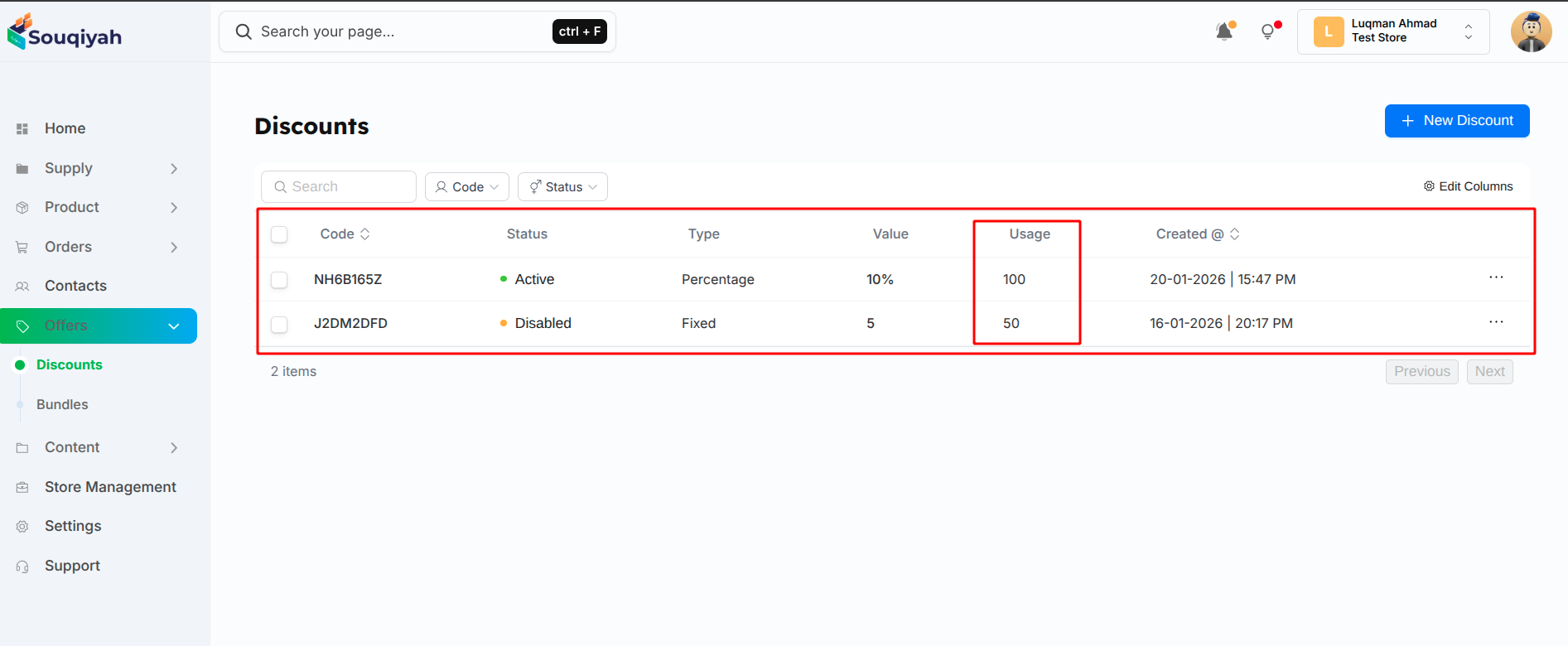
Step 1: Viewing Discount List
- Go to Offers → Discounts
- Table shows:
- Code
- Status
- Type and Value
- Usage count
- Created date
Step 2: Understanding Usage Statistics
- Usage: How many times the code was used
- Usage Left: Remaining uses (if limited)
- Status: Active, Disabled, or Expired
Step 3: Checking Individual Discount Performance
- Click on a discount to view details
- See:
- Total usage
- Usage remaining
- Date range
- Applied products/tags
Step 4: Monitoring Active Campaigns
- Filter by "Active" status
- See all live discounts
- Monitor usage in real time
- Check expiration dates
Step 5: Analyzing Performance
- Compare usage across discounts
- Identify most popular codes
- See which types work best
- Track seasonal trends
Step 6: Reviewing Expired Campaigns
- Filter by "Expired" status
- Review past campaigns
- See final usage numbers
- Learn from results
Performance Metrics to Track
- Usage Count: How many times used
- Usage Rate: Usage vs. limit (if limited)
- Status: Active or expired
- Date Performance: Usage over time
- Product Performance: Which products sold with discount
Using Performance Data
- Identify successful campaigns
- Replicate what works
- Adjust underperforming offers
- Plan future campaigns
- Optimize discount strategies
Performance Tips
- Review performance regularly
- Compare similar campaigns
- Track seasonal patterns
- Monitor usage limits
- Adjust campaigns based on data